当前位置:
首页>
技术文章>
Pytest 单元测试框架入门
当前位置:
首页>
技术文章>
Pytest 单元测试框架入门
1、pytest 是 python 的第三方单元测试框架,比自带 unittest 更简洁和高效
2、安装 pytest
pip install pytest
3、验证 pytest 是否安装成功
pip show pytest
4、使用 pytest 执行测试需要遵行的规则
搜索根目录:默认从当前目录中搜集测试用例,即在哪个目录下运行pytest命令,则从哪个目录当中搜索
符合命名规则 test_*.py 或者 *_test.py 的文件
文件中识别用例的规则:
以test_开头的函数名
以Test开头的测试类(没有__init__函数)当中,以test_开头的函数
断言必须使用 assert,pytest 中没有自带的断言方法
5、pytest 执行方式
指定文件/模块
pytest –v filename(最高级别信息 — verbose)
pytest -s filename(输出打印)
pytest -v -s filename
pytest -q filename(静默输出,不会打印用例输出)
指定一个或多个目录
pytest dir01 # dir01 为用例目录
pytest dir01 dir02
指定运行py文件中的某一个类
test_demo1.py 为文件名称
Test02 为类名称
pytest test_demo1.py::Test02
指定运行某个类中的某一个方法
test_demo1.py 为文件名称
Test01 为类名称
test_01 为方法名称
pytest test_demo1.py::Test01::test_01
6、实例介绍一
dos 窗口中执行用例
# test_demo1.py
def test_01():
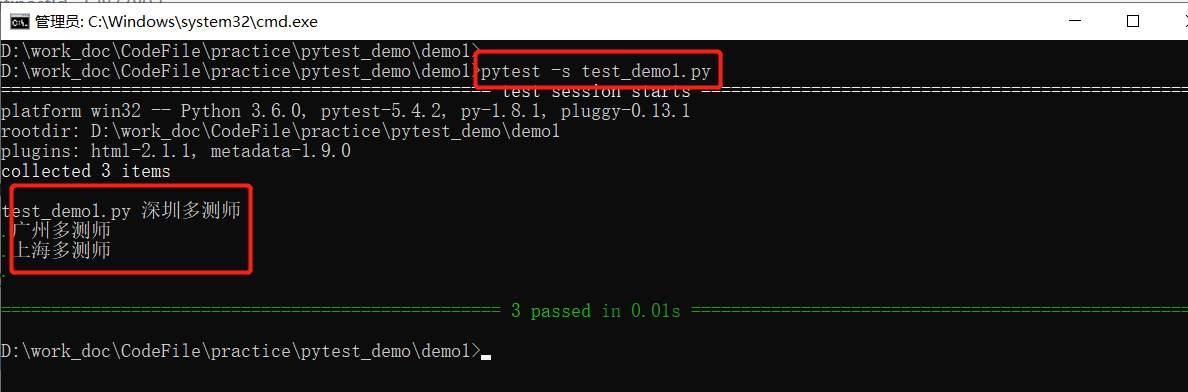
    print("深圳多测师")

def test_02():
    print("广州多测师")

def test_03():
    print("上海多测师")
执行方法一:pytest -q test_demo1.py

执行方法二:pytest -s test_demo1.py
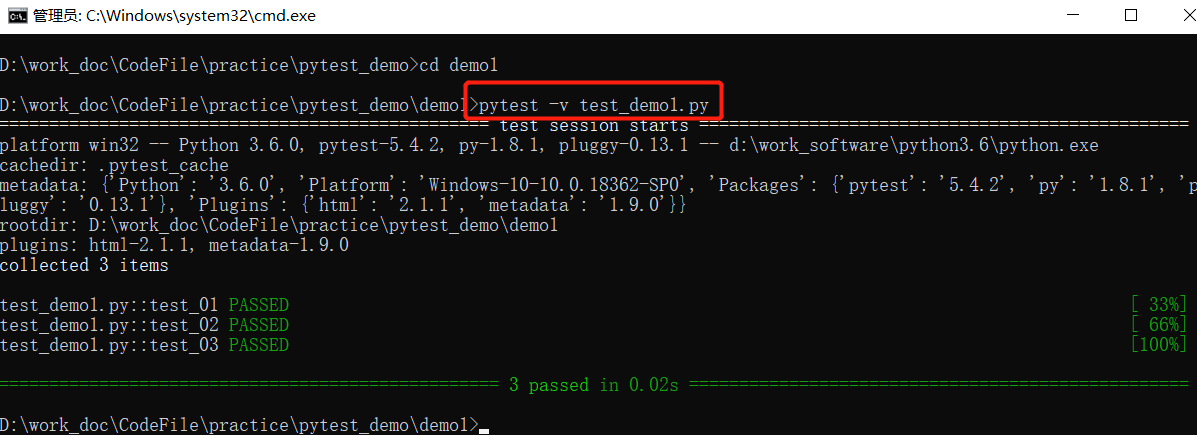
执行方法三:pytest -v test_demo1.py
执行方法四:pytest -v -s test_demo1.py

7、实例介绍二
demo1
demo1 发现结果中没有用例的执行打印结果
# test_demo.py
import pytest
def test_01():
    print("深圳多测师")

def test_02():
    print("广州多测师")

def test_03():
    print("上海多测师")

if __name__ == '__main__':
    pytest.main()

# 结果如下
============================= test session starts =============================
platform win32 -- Python 3.6.0, pytest-5.4.2, py-1.8.1, pluggy-0.13.1
rootdir: D:\work_doc\CodeFile\practice\pytest_demo
plugins: html-2.1.1, metadata-1.9.0
collected 3 items

test_demo1.py ...                                                        [100%]
============================== 3 passed in 0.05s ==============================
Process finished with exit code 0
demo2
demo2 中在 main() 中加入 ["-s"],结果中就可以展示打印结果
import pytest

def test_01():
    print("深圳多测师")

def test_02():
    print("广州多测师")

def test_03():
    print("上海多测师")

if __name__ == '__main__':
    pytest.main(["-s"])    # 在 main() 中加入 ["-s"]

# 结果如下
============================= test session starts =============================
platform win32 -- Python 3.6.0, pytest-5.4.2, py-1.8.1, pluggy-0.13.1
rootdir: D:\work_doc\CodeFile\practice\pytest_demo
plugins: html-2.1.1, metadata-1.9.0
collected 3 items

test_demo1.py 深圳多测师
.广州多测师
.上海多测师
.============================== 3 passed in 0.02s ==============================
Process finished with exit code 0
demo3
运行指定的用例文件
# test_demo1.py

def test_01():
    print("深圳多测师")

def test_02():
    print("广州多测师")

def test_03():
    print("上海多测师")
# run_all.py import pytest if __name__ == '__main__': pytest.main(["D:/test_demo1.py"]) # 结果如下 ============================= test session starts ============================= platform win32 -- Python 3.6.0, pytest-5.4.2, py-1.8.1, pluggy-0.13.1 rootdir: D:\ plugins: html-2.1.1, metadata-1.9.0 collected 3 items test_demo1.py ... [100%] ============================== 3 passed in 0.01s ============================== Process finished with exit code 0
demo4
运行指定目录下的用例文件
# demo1/test_demo1.py  demo1 目录下的 test_demo1.py 文件

def test_01():
    print("深圳多测师")

def test_02():
    print("广州多测师")

def test_03():
    print("上海多测师")
# demo2/test_demo2.py demo2 目录下的 test_demo2.py 文件
def test_04():
print("杭州多测师")
def test_05():
print("北京多测师")
def test_06():
print("重庆多测师")import pytest if __name__ == '__main__': pytest.main(["D:/demo1","D:/demo2"]) # 指定 D:/demo1 和 D:/demo2 目录 # 结果如下 ============================= test session starts ============================= platform win32 -- Python 3.6.0, pytest-5.4.2, py-1.8.1, pluggy-0.13.1 rootdir: D: plugins: html-2.1.1, metadata-1.9.0 collected 6 items demo1\test_demo1.py ... [ 50%] demo2\test_demo2.py ... [100%] ============================== 6 passed in 0.04s ============================== Process finished with exit code 0